
VersaCRM2.0.0 - Download
You'll be able to download in few seconds.
Publisher Description
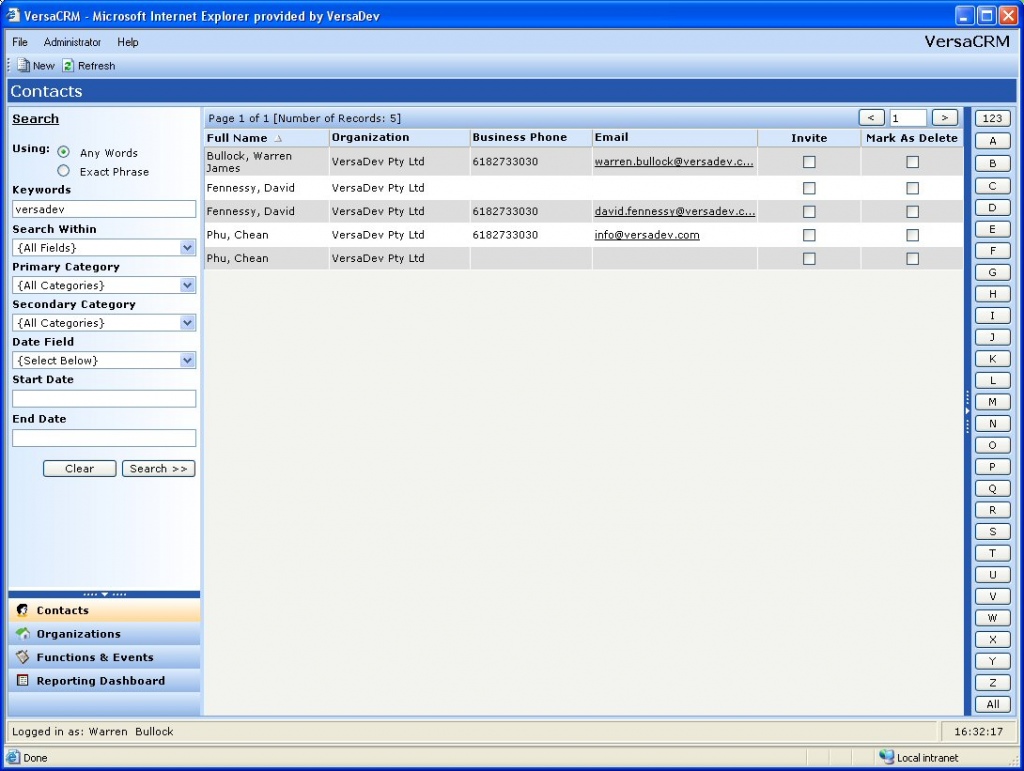
versaCRM is a flexible and powerful Web Browser delivered CRM solution for managing corporate Contacts, Organizations, Functions and Events related data. versaCRM includes the ability to track all correspondence, including invitations to functions and events, as well as other forms of communication relating to your Contacts. versaCRM's intelligent cross referenced design model means that relational Contact & Organization data is not isolated and disparate, allowing for full entity relationship matching and giving you the power to profile your data more effectively. Based on the Microsoft .NET Framework, versaCRM provides a flexible and scalable solution for managing contact data. versaCRM takes advantage of the latest advancements in browser technology to provide a more intuitive user interface. versaCRM combines a browser-based interface with a database back-end, globally accessible system. What makes versaCRM stand out from the crowd is its unique 'look and feel'. Although a browser-based application, versaCRM does not look like a traditional Webpage. Instead, it has been designed to work as a desktop application, providing the benefits of an intuitive interface with the latest advancements in browser technology.
About VersaCRM
This Vertical Market Apps program is available in English. It was last updated on 29 September, 2026. VersaCRM is compatible with the following operating systems: Windows.
The company that develops VersaCRM is VersaDev. The latest version released by its developer is 2.0.0.
The download we have available for VersaCRM has a file size of 2.1 MB. Just click the green Download button above to start the downloading process. The program is listed on our website since 2005-12-20 and was downloaded 0 times. We have already checked if the download link is safe, however for your own protection we recommend that you scan the downloaded software with your antivirus. Your antivirus may detect the VersaCRM as malware if the download link is broken.
How to install VersaCRM on your Windows device:
- Click on the Download button on our website. This will start the download from the website of the developer.
- Once the VersaCRM is downloaded click on it to start the setup process (assuming you are on a desktop computer).
- When the installation is finished you should be able to see and run the program.
Program Details
System requirements
Download information
Pricing
Version History
version 2.0.0
posted on 2005-12-20
Completely New Version
Disclaimer
External Download
We do not host VersaCRM on our servers. We did not scan it for viruses, adware, spyware or other type of malware. This app is hosted by the software publisher and passed their terms and conditions to be listed there. We recommend caution when installing it.
The external download link for VersaCRM is provided to you by apps112.com without any warranties, representations or guarantees of any kind, so access it at your own risk.
If you have questions regarding this particular app contact the publisher directly. For questions about the functionalities of apps112.com contact us.
